Free browser game · No download
Closing Shift
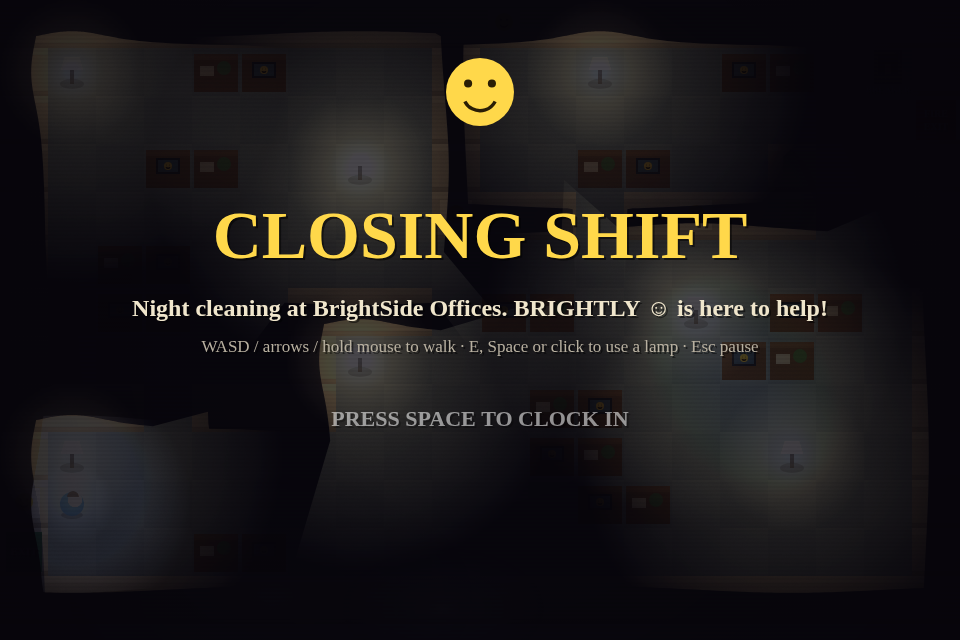
Switch off the office lights and clock out in Closing Shift, a short browser horror game you can start playing right away.
BylynflippenReleasedLink checked Oct 24, 2026
How to play Closing Shift
- Walk with WASD, the arrow keys, or by holding the mouse or touch screen.
- Press E or Space, or click near a lamp, to switch it off.
- Switch off the office lights and clock out.
- Press Esc to pause, adjust volume, or reduce flashing and shake.

Made Closing Shift? Tell us and we will update or remove this page.Contact Us
Play Other Games
See all hot games →



More Survival Games
See all →

Just Added
See all new games →
About Closing Shift
What is Closing Shift?
Closing Shift is a short, single-player psychological horror game set at the end of a workday in the BrightSide Offices. You are there to switch off the lights and clock out, with BRIGHTLY, the building’s friendly assistant, guiding you. The game was made by lynflippen during a game jam as a single HTML5 canvas file. You can play it in your browser on itch.io.
How a run of Closing Shift plays
Your job sounds simple: walk through the office, switch off the lights, and clock out. Move with WASD, the arrow keys, or by holding the mouse or touch screen. Press E or Space, or click near a lamp, to switch it off. The game’s description gives that task and those controls, but does not specify what ends a run or a score to chase. Its office sensors say you are alone. The assistant and the interface may not be telling the truth.
Why Closing Shift is worth a try
Closing Shift takes a sunny corporate office and gives it a creepy edge. Its stated theme is “something wicked” in an office, with no pumpkins, and something inside lying—including the assistant and the interface. That everyday setting makes the task of shutting off the lights feel uneasy. The game also credits AI assistance for its code, graphics, sounds, and text, and says it uses no third-party assets. If you want a monster-collecting upgrade loop, those details are not part of the listed premise.
Who will enjoy Closing Shift
Closing Shift suits players looking for a short, single-player horror experience they can open in a browser tab. It gives you a clear task—turn off the office lights and clock out—and a set of simple movement and lamp controls. The listed tags describe it as short, so expect a compact visit rather than a long series of runs. The game facts do not mention collectibles, upgrades, or a high-score chase. Fans of quick arcade action may enjoy the brief session, with a creepy office mood instead of a survivors-like loop.
FAQ
Closing Shift FAQ
Is Closing Shift free to play?
Yes. Closing Shift is listed as free on its itch.io page, so you can try the short horror game without paying. It is a browser game, and the facts do not mention a download requirement.
Who made Closing Shift?
Closing Shift was made by lynflippen during a game jam. The creator says an AI model helped produce the code, graphics, sounds, and text, starting from their own pre-jam canvas template. The game uses no third-party assets.
Where can I play Closing Shift?
You can play Closing Shift in your browser on itch.io. The game is listed as HTML5, so it runs as a browser experience. Visit the itch.io page to start playing and see its controls.
How do you play Closing Shift?
Walk through the BrightSide Offices with WASD, the arrow keys, or by holding the mouse or touch screen. Press E or Space, or click near a lamp, to switch it off. Your stated task is to turn off the lights and clock out.
Is Closing Shift like a survivors-like game?
Closing Shift is listed as a short psychological horror game, not as a survivors-like. Its stated task is to walk through an office, switch off lamps, and clock out. The provided facts do not mention waves, collectible monsters, upgrades, or repeated runs.
Is Closing Shift finished or still in development?
Closing Shift is listed as Released, so it is presented as a finished game rather than one still in development. The creator says it was made during a game jam as a single HTML5 canvas file.