Free browser game · No download
Cozy Museum
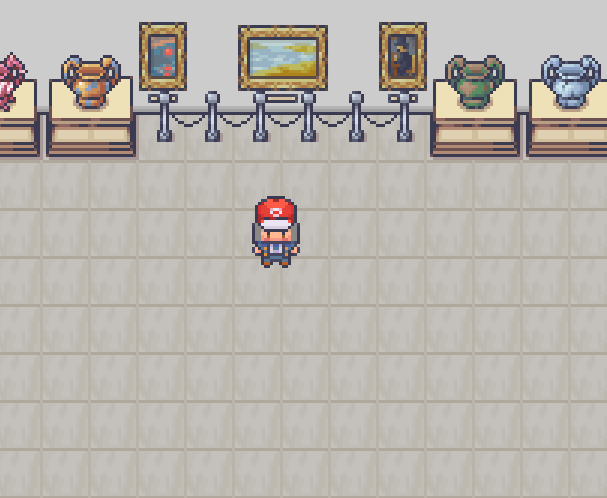
Walk a shared art gallery, make a tiny drawing, and see it join the walls in Cozy Museum.
ByVaanReleasedLink checked Oct 27, 2026
How to play Cozy Museum
- Walk around the museum and visit an easel to draw on the built-in 32x32 canvas.
- Use the cozy color palette, bucket fill, and shape tools to create your artwork.
- Browse the live gallery wall or use the Archive PC to view older art and like favorites.

Made Cozy Museum? Tell us and we will update or remove this page.Contact Us
- Simulation
- 2D
- Casual
- Colorful
- Cozy
- Creative
- Drawing
- Godot
Play Other Games
See all hot games →








More Simulation Games
See all →




Just Added
See all new games →About Cozy Museum
What is Cozy Museum?
Cozy Museum is a casual, creative simulation by Vaan. It runs in a browser on itch.io, where visitors can walk around a relaxing gallery and look at art made by the community. You can also create a 32x32 drawing with a built-in canvas, then see it framed on the gallery wall. The game supports real-time multiplayer, so other visitors can be in the museum with you. It is a small place to draw, browse, and enjoy a calmer kind of browser game.
How a run of Cozy Museum plays
Walk through the museum and check out the artworks currently on display. When you want to contribute, step up to an easel and use the built-in canvas to make a 32x32 piece with the cozy color palette, bucket fill, or shape tools. Submitted art is framed on the live gallery wall for people in the room to see. The main gallery shows up to 90 recent works. There is also an Archive PC for browsing older submissions and liking favorites. New creations have a three-minute drying cooldown.
Why Cozy Museum is worth a try
Cozy Museum trades the usual action-game rush for a shared gallery you can wander with other visitors in real time. Its small 32x32 canvas gives you a simple way to add your own art, and the live wall puts new submissions on display for everyone in the room. When you want to see work beyond the main gallery’s recent 90 pieces, the Archive PC lets you browse older creations and like favorites. It’s a creative, social change of pace for a browser game.
Who will enjoy Cozy Museum
Cozy Museum suits casual players who want a relaxed browser session, enjoy drawing, or like browsing community creations with other visitors. You can make a small piece and see it displayed, or simply wander the gallery and explore its archive. Expect a calm creative simulation rather than a survivors-like run or a high-score chase. The game is released, and new drawings have a three-minute cooldown, so it’s better for taking your time than rapid-fire creating.
FAQ
Cozy Museum FAQ
Is Cozy Museum free to play?
Yes. Cozy Museum is listed as free on its itch.io page, so you can visit the gallery and try its drawing tools without paying.
Who made Cozy Museum?
Cozy Museum was made by Vaan. The creator credits assets from LimeZu, Vryell, and flowerheadmusic for the environment art, interface, and audio.
Where can I play Cozy Museum?
You can play Cozy Museum in your browser on itch.io. This page is part of a fan-run game directory; the game itself is hosted on itch.io.
How do you play Cozy Museum?
Walk around the gallery to view community art, or go to an easel and make a drawing on the 32x32 canvas. Submitted pieces appear on the live gallery wall. Use the Archive PC to browse older creations and like favorites.
Is Cozy Museum like a survivors-like game?
Not really. Cozy Museum is a casual creative simulation centered on walking through a shared gallery, drawing, and browsing community artwork. It has no described combat or survival runs, so expect a relaxed art hangout rather than a survivors-like loop.
Is Cozy Museum finished or still in development?
Cozy Museum is marked as released. The available information does not say whether development will continue, so its future updates are unclear.